Photography CRM for photographers Your clients aren't rows in a spreadsheet.
StudioFolio brings a CRM and studio management together for photographers. Each client is linked to their shoots, contracts, invoices, messages and galleries, so you always know where every job stands.
Free to start · No credit card required
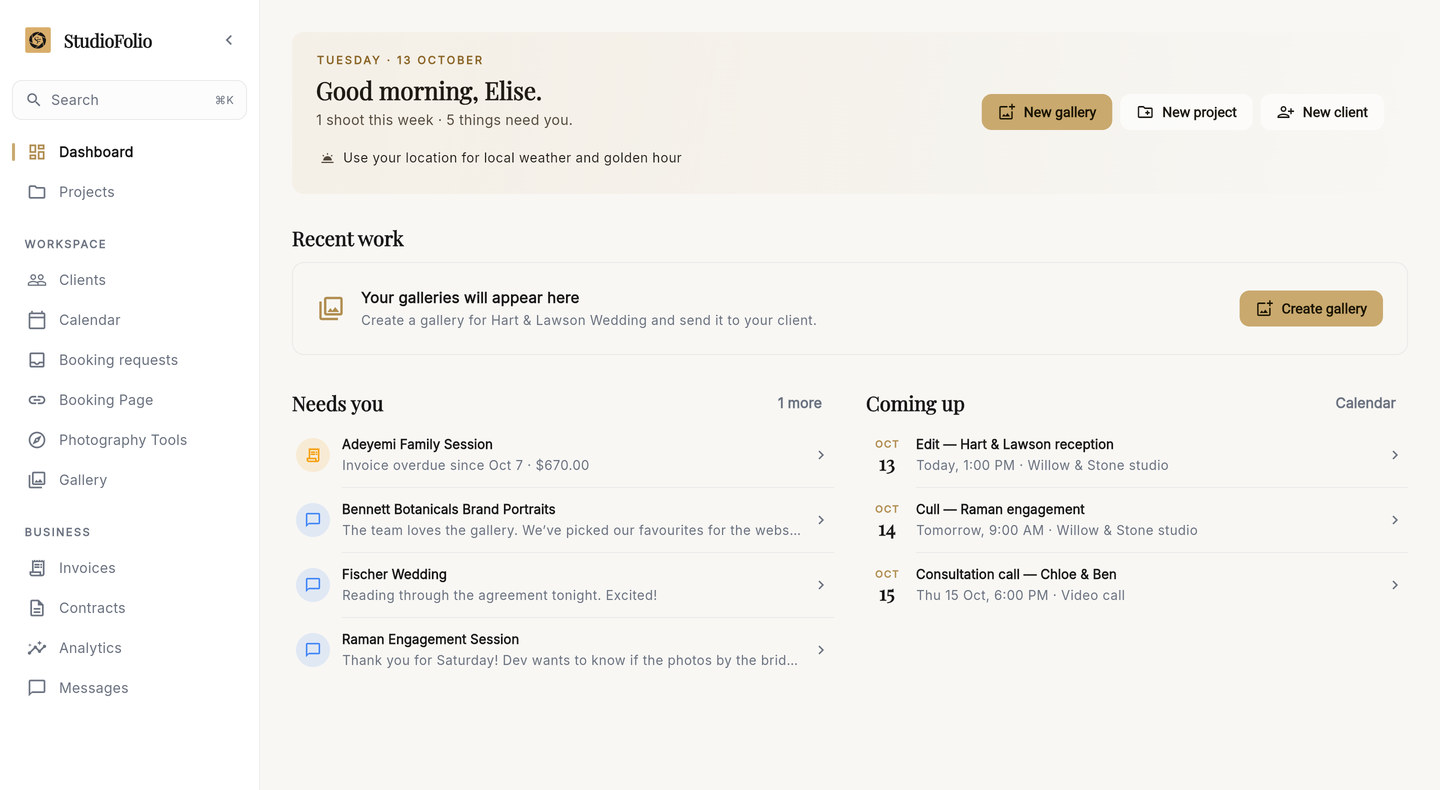
Most studios run on six apps and a good memory.
- The inquiry
- in your email
- The shoot date
- in a calendar app
- The contract
- in a document and a signing service
- The deposit
- in a payments app
- What the couple told you
- in the notes on your phone
- The photographs
- in a cloud folder
Each one works. None of them knows about the others, so you are the one keeping them in step.
One connected workflow, from first inquiry to final payment.
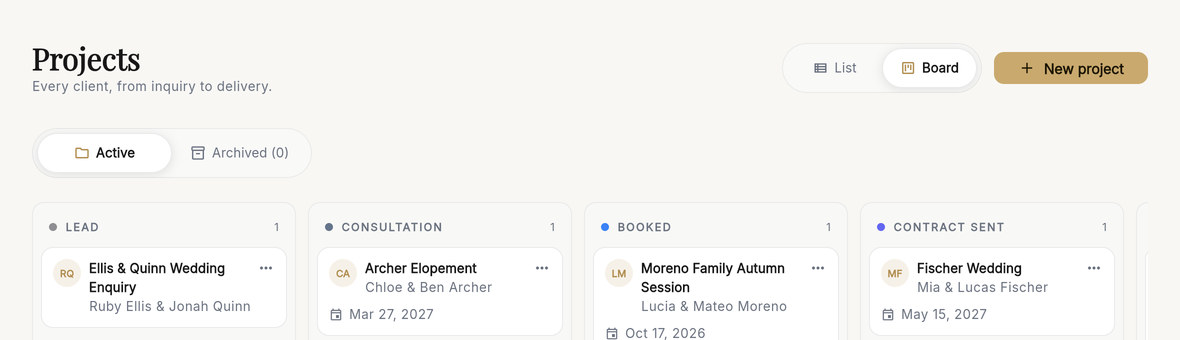
In StudioFolio every shoot is a project, and every project belongs to a client. The project board shows them all, stage by stage, from a new lead to a finished job. When a job moves on, drag its card to the next stage.
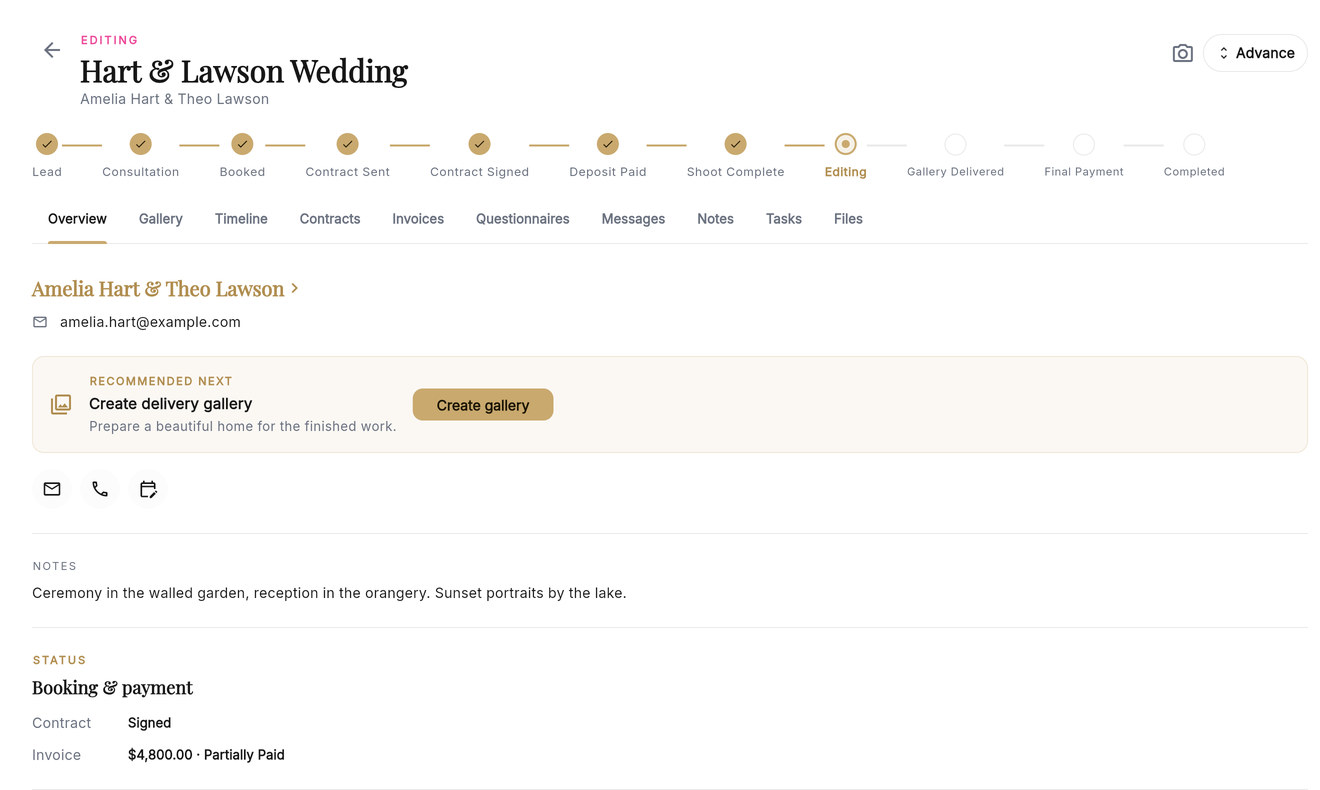
Open a project and the whole job is there.
Where it stands
A stage tracker runs along the top. Advance moves the job to its next stage.
What to do next
The project suggests the next step, such as creating the delivery gallery once editing has started.
Everything attached
The gallery, timeline, contracts, invoices, questionnaires, messages, notes, tasks and files each have a tab on the same project.
Clients, remembered properly.
A wedding couple might book an engagement session, the wedding and, years later, a family shoot. In StudioFolio those are three projects under one client, not three rows in three different places.
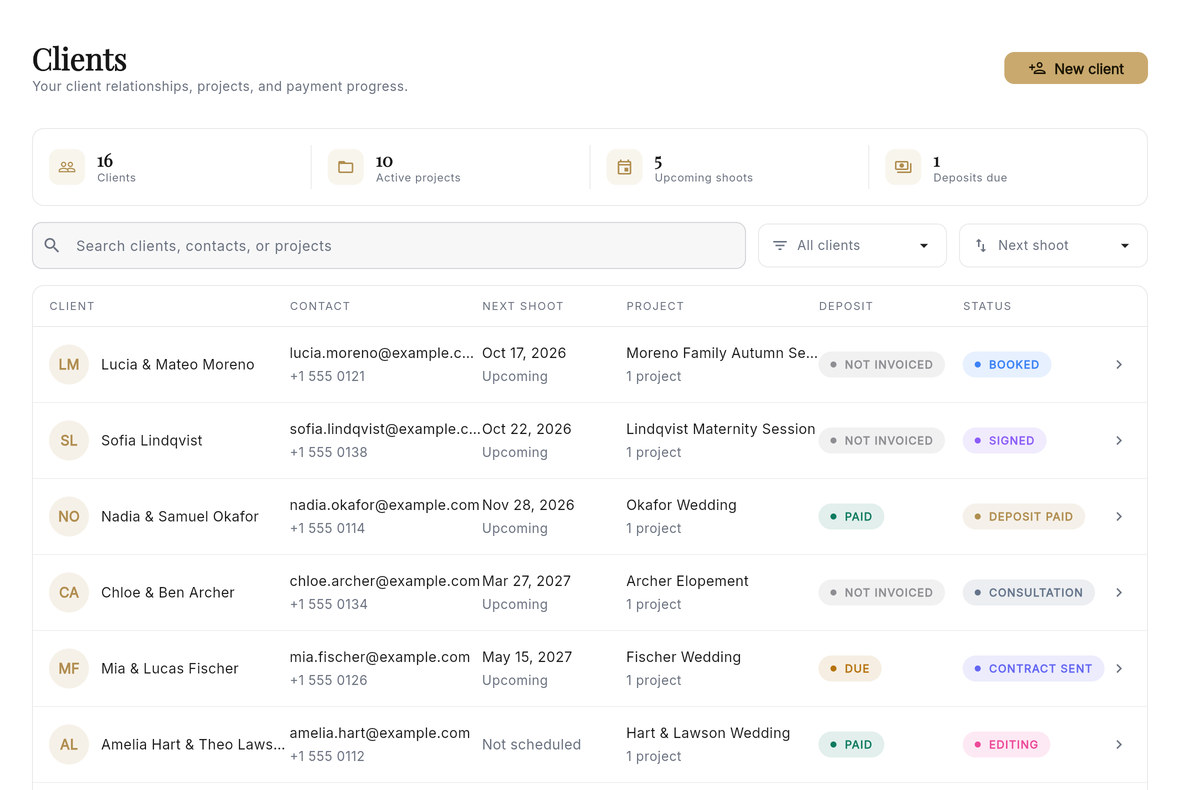
The whole studio at a glance
The client list shows each client's next shoot, current project, deposit and stage, and you can search by client, contact or project.
The whole relationship in one place
Open a client to see their contact details, the notes you've kept and every project you've done together.
From “Are you available?” to the final gallery.
Here is how a booking moves through StudioFolio.
-
A booking request arrives
Clients ask for a date on your booking page, and the request waits in your Booking requests inbox. When you confirm it, StudioFolio adds the client, creates the project, puts the shoot in your calendar, drafts the invoice for the deposit or the booking, adds starter tasks and emails the client that they're booked.
-
The contract
Send the contract from the project for e-signature. You can see when it has been viewed and when it is signed.
-
The invoice
List what the client is paying for and split the total into a deposit and a balance, each with its own due date. Payments are recorded against the invoice. Connect your own Stripe, Paystack or Flutterwave account to take payments online.
-
The shoot
Before the day, StudioFolio's photography tools show the light and weather for your date and location. On location, Shoot Day on your phone shows the client's details, directions, your notes and a shot list to tick off.
-
The gallery
Deliver a private gallery for proofing and favourites, linked to the project. Messages clients send from their gallery arrive in your inbox. More about client galleries and proofing.
-
The finish
When the job is done, mark it complete. Archiving it later frees a project slot on the free plan and keeps the client and all its records.

Reply to clients from wherever the shoot takes you.
StudioFolio works on your phone. Check what's coming up on the dashboard, open a client or project, and answer messages between sessions.
The project board is a desktop view. On a phone, the same projects appear as a list.


Free to start. One simple upgrade.
Every core feature is on both plans. Unlimited removes Starter's limits.
Starter
Free forever, no credit card
- Every core feature
- 3 active projects
- 1 storage connection
- 20 portfolio photos on your booking page
- 3 gallery cover designs and 3 grid layouts
Unlimited
$12 a month, billed annually, or $15 billed monthly
- Every core feature
- Unlimited active projects
- Unlimited storage connections
- Unlimited portfolio photos
- Every cover design and grid layout
Galleries use the Google Drive or Dropbox you already have, or StudioFolio Cloud as a paid add-on. Everything included free, in detail.
Questions about StudioFolio as a CRM.
What is a photography CRM?
A photography CRM is software built around how a photography business actually runs. Clients, projects, bookings, contracts, invoices and galleries connect to each other instead of living in separate apps.
Why do photographers need a CRM?
A CRM keeps a client's whole relationship in one place. Instead of checking email, a calendar and a spreadsheet, you open one client and see their projects, notes and exactly where each one stands.
How is a photography CRM different from a normal CRM?
Most CRMs stop at a signed deal. A photography CRM keeps going through the booking, the shoot itself, editing, proofing and delivery, then keeps the client relationship on record after the gallery ships.
Can StudioFolio manage photography projects?
Yes. Every project tracks its client, shoot date and location, stage, notes, tasks, contract and invoice status and its linked gallery, all in one place.
Can StudioFolio track leads and bookings?
Yes. Requests from your booking page arrive in a Booking requests inbox. Confirm one and it becomes an organised project with a real date on your calendar, and every project moves through the same pipeline stages, from Lead to Completed.
Does StudioFolio include contracts and invoices?
Yes. Contracts are sent for a real e-signature and tracked through to signed. Invoices track line items, balance and payment history. You connect your own Stripe, Paystack or Flutterwave account to actually get paid.
Can I manage client galleries from StudioFolio?
Yes. Deliver a private gallery for proofing and favourites, connected to the client's project. Clients can message you from their gallery, and the conversation appears in your Messages inbox. Explore client galleries and proofing.
Does StudioFolio work on my phone?
Yes. On a phone you can check your dashboard, open clients and projects, and reply to messages. Shoot Day is designed for use on location. The project board is a desktop view; on a phone, your projects appear as a list.
Is StudioFolio a good CRM for wedding photographers?
Yes. Weddings are long, detailed jobs, and StudioFolio keeps the contract, deposit and balance, notes, messages and gallery on one project. It suits portrait, family, event, commercial and freelance photographers too.
Is StudioFolio free?
Yes. The Starter plan is free forever, with every core feature included and no credit card required. See the full free-plan breakdown.
Bring your next inquiry into StudioFolio.
Free to start · No credit card required